
How data-safety-from-code works, step by step
The skill splits the work between scripts and the agent. Scripts do everything that must come out the same on every run: reading files, matching SDKs, writing and validating the CSV. The agent does the judgement calls: following data through your code, deciding what leaves the device, and asking you what the code can’t show.
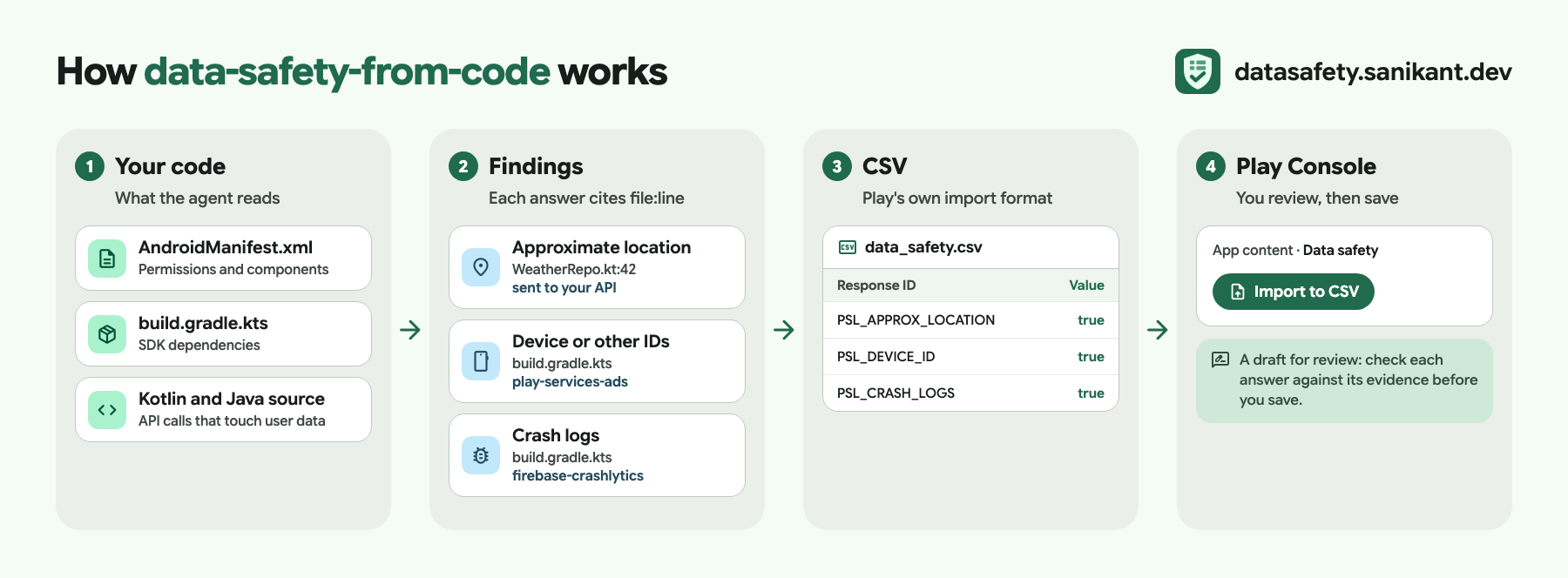
The examples below come from the test fixtures in the repo: a small weather app that sends the user’s coarse location to its API over plain HTTP.
1. Scan
Section titled “1. Scan”scan.py walks the project, skipping build outputs, and reads:
| Source | What it looks for |
|---|---|
AndroidManifest.xml (all source sets, plus the merged release manifest if you’ve built) |
Permissions, usesCleartextTraffic, networkSecurityConfig |
build.gradle, build.gradle.kts, gradle/libs.versions.toml |
Dependencies, including version-catalog aliases and bundles, and their configuration (implementation ships; testImplementation and debugImplementation don’t) |
./gradlew :app:dependencies output (optional) |
SDKs pulled in transitively |
res/xml/network_security_config.xml |
cleartextTrafficPermitted |
| Kotlin and Java source | 20 kinds of signal: HTTP clients, uploads, Firestore writes, analytics events, AI requests, sign-in methods, device identifiers, billing, contacts, installed apps and more |
Source, res/values, Gradle |
Plain http:// URLs |
For every permission it knows, it also checks whether your code calls the API that reads that data. In the weather app, the camera permission is never used:
{ "name": "android.permission.CAMERA", "file": "app/src/main/AndroidManifest.xml", "line": 5, "types": ["PSL_PHOTOS", "PSL_VIDEOS"], "used_in_code": false}And it combines the cleartext settings with the URLs it found:
"encrypted_in_transit_suggestion": false,"reason": "plain http:// URLs found and cleartext traffic is permitted"2. Match SDKs
Section titled “2. Match SDKs”Each dependency is matched against knowledge/sdks.yaml. An entry lists what the vendor says the SDK collects or shares, for which purposes, and a link to the vendor’s Play data disclosure. Data the SDK always sends goes into the draft automatically. Data it sends only under a condition, such as Crashlytics with a user ID attached, goes to review so the agent can check the code for that condition. Browse the SDK entries.
3. Judge
Section titled “3. Judge”The scan flags code; it doesn’t decide. The agent opens each flagged line and follows the data. Here the location goes from FusedLocationProviderClient straight into a Retrofit call, so it leaves the device. The API only uses it to answer the request, so the processing is ephemeral. The agent records that decision with its evidence:
{ "type": "PSL_APPROX_LOCATION", "collected": true, "shared": false, "ephemeral": true, "purposes": ["PSL_APP_FUNCTIONALITY"], "reason": "Coarse location is sent to the weather API to fetch the forecast, not stored", "evidence": ["app/src/main/java/dev/example/weather/LocationRepository.kt:12"]}It asks you only what code can’t show: your privacy policy URL, account creation and deletion, what your backend shares, and which data is optional for users. Google’s definitions the agent follows are in the definitions reference.
4. Fill
Section titled “4. Fill”draft.py merges SDK data, the agent’s decisions and your answers into a declaration. Purposes are combined across sources; a type is ephemeral only if every source that collects it says so. fill_csv.py writes it into the template: your own Play Console export when you give one, otherwise the bundled copy. Only the Response value column changes. Rows, order, labels and line endings stay byte for byte, which is what lets Play Console import the file.
5. Validate
Section titled “5. Validate”validate.py checks the file the way the form does:
- rows and answer requirements match the template exactly
- values are only
true,false, blank or text where text is expected - the required question is answered; “no account creation” isn’t combined with other methods; an account deletion URL is given when users can create accounts
- every selected data type says collected and/or shared, answers the ephemeral question, picks exactly one of required/optional, and has at least one purpose
- data types that aren’t selected have no usage answers
6. Report
Section titled “6. Report”report.py writes the review report. For the weather app, the part that needs a human looks like this:
## Needs your review
- `android.permission.CAMERA` is declared in `app/src/main/AndroidManifest.xml:5` but no code uses it.  If no library needs it, remove it: unused sensitive permissions are a policy risk on their own.- HTTP client: data passed to these calls leaves the device —  `app/src/main/java/dev/example/weather/LocationRepository.kt:4` (+2 more).- Plain HTTP URL `http://api.weather-fixture.net/v1/` at  `app/src/main/java/dev/example/weather/LocationRepository.kt:8`.
When you pass your current export, the report also lists what changed: data types added or removed, purposes, sharing and the top-level answers. See a full example report.
Built by Sanikant. Set in Google Sans Flex (SIL Open Font License), icons from Material Symbols (Apache 2.0). Google Play is a trademark of Google LLC; this project is not affiliated with Google. Output is a draft for review: you are responsible for your Data safety declaration.