
Open-source agent skill for Android apps
Google Play Data safety form, filled from your code
Your agent scans the manifest, Gradle files and source, matches every SDK against its vendor's disclosure, and writes the CSV that Play Console imports. Each answer comes with the file and line that justify it.
- Device or other IDs
PSL_DEVICE_IDplay-services-ads ·build.gradle.kts:17Collected + shared - Crash logs
PSL_CRASH_LOGSfirebase-crashlytics ·libs.versions.toml:12Collected - Approximate location
PSL_APPROX_LOCATIONsent to your weather API ·WeatherRepo.kt:42Collected
See it in 46 seconds
Section titled “See it in 46 seconds”Why the Data safety form goes wrong
Section titled “Why the Data safety form goes wrong”Every app on Google Play must declare what user data it collects and shares. Play Console’s form has 782 possible answers, and most of what an app collects comes from SDKs you didn’t write. An ads SDK can share your users’ device IDs. A crash reporter collects diagnostics. A “simple” analytics call sends app interactions. Miss one and the form no longer matches the app, which is what Google’s review checks.
build.gradle, version catalogs and, if you run Gradle, the full dependency tree, then matches each SDK against its vendor’s Play disclosure.true to a file and line, or to the SDK vendor’s page, and lists what still needs a human: your backend, older app versions, console settings.How it works
Section titled “How it works”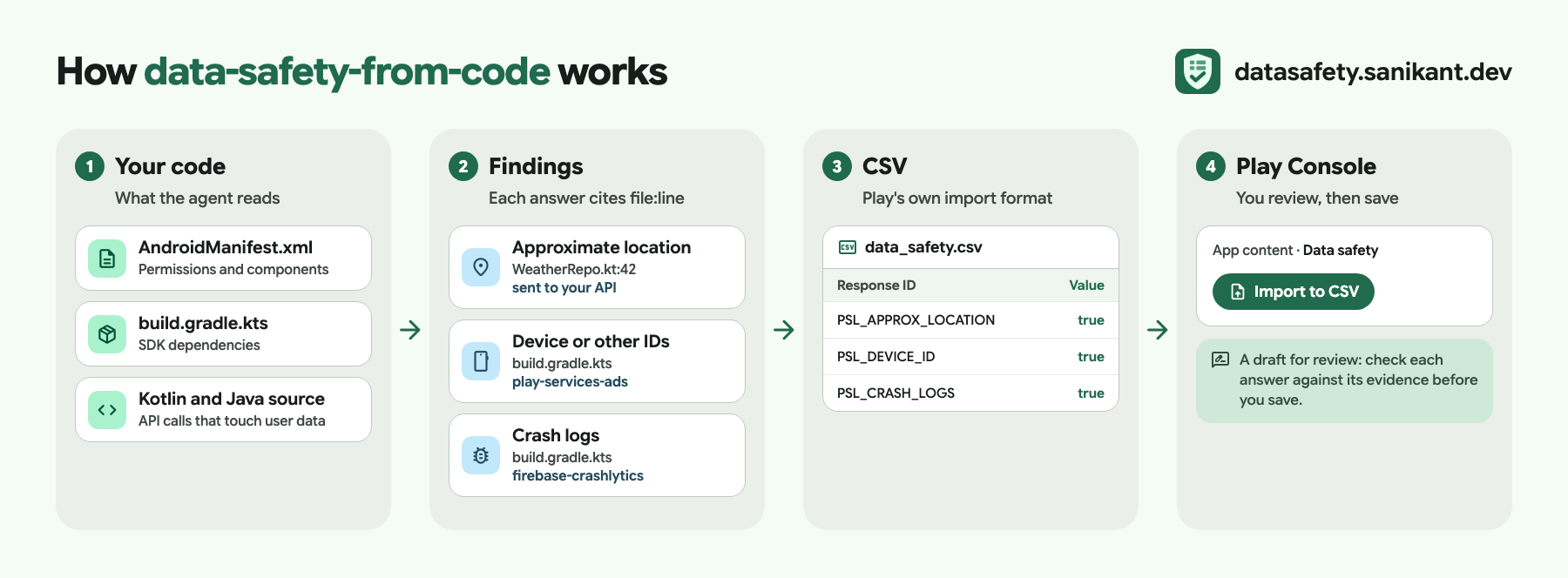
- Scan. A Python script reads your manifests, Gradle files, version catalog, source and network security config. No network calls, no dependencies.
- Judge. Your agent checks each finding: is this data sent off the device? To a third party? Why? It asks you only what code can’t show, such as your deletion policy or what your backend shares.
- Fill. The answers go into Google’s own CSV template. Only the answer column changes, so Play Console accepts the import.
- Validate and report. Every conditional question is checked before you upload. The report shows each answer’s evidence and what changed compared to your current form.
SDKs it knows
Section titled “SDKs it knows”Answers for these come from each vendor’s own Play data disclosure. All SDKs, including inferred entries →
Guides
Section titled “Guides”- How to fill the Data safety form on Google Play
- How to import a Data safety CSV in Play Console
- Collected vs shared: what each means
- Ephemeral processing, explained
- Data safety form rejected? Common causes
- The Data safety form for an app that collects no data
Questions
Section titled “Questions”Does it submit the form for me? No. You review the CSV and report, then import it yourself. More in the FAQ →
Is the result guaranteed to be accepted? No. It is a draft with evidence; you are responsible for the declaration. Why →
Which agents does it work with? Claude Code as a plugin, and Codex, Cursor, Copilot and other SKILL.md-aware agents through the skills CLI. Install →
Install
Section titled “Install”/plugin marketplace add sanikantv/data-safety-from-code/plugin install data-safety-from-code@data-safety-from-codeclaude plugin marketplace add sanikantv/data-safety-from-codeclaude plugin install data-safety-from-code@data-safety-from-codenpx --yes skills add sanikantv/data-safety-from-code --skill data-safety-from-code -ygit clone https://github.com/sanikantv/data-safety-from-code.gitcp -r data-safety-from-code/skills/data-safety-from-code ~/.claude/skills/Then, in your Android project:
/data-safety-from-code fill the Data safety form for this appYour agent asks for your current Play Console export (App content → Data safety → Export to CSV), scans the project, asks a few questions, and writes data-safety/data_safety.csv and data-safety/data_safety_report.md.
Built by Sanikant. Set in Google Sans Flex (SIL Open Font License), icons from Material Symbols (Apache 2.0). Google Play is a trademark of Google LLC; this project is not affiliated with Google. Output is a draft for review: you are responsible for your Data safety declaration.